PCB Prototyping: From Design to First Boards
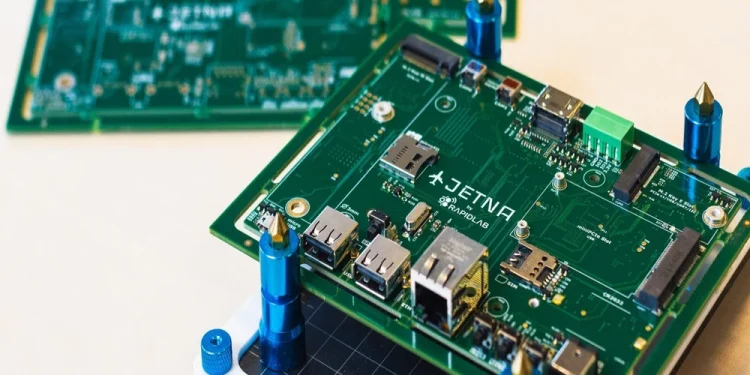
There’s a particular kind of excitement that comes with ordering your first batch of prototype PCBs. You’ve spent hours in your EDA software, the schematic looks right, the layout is as clean as you could make it, and now you’re about to find out whether it all works in the real world. Prototyping is where hardware development gets real, and understanding the process from end to end makes it go a lot more smoothly.
Here’s a practical walkthrough of everything that happens between a finished design and a stack of boards on your workbench.
Step One: Finalise Your Design Files
Before anything goes to a manufacturer, your design needs to be in a state that’s actually ready to fabricate. That means more than just finishing the layout. It means verifying it.
Run your EDA software’s design rule check (DRC) and fix every error it flags. The DRC catches violations of your manufacturer’s constraints: traces that are too narrow, clearances that are too tight, copper that’s too close to the board edge, and drill sizes that are too small. Sending files with DRC errors to a manufacturer is a fast way to either receive boards back with problems or get an email asking you to fix the files before they’ll proceed.
Run an electrical rules check (ERC) on your schematic as well. Net connection errors and unconnected pins that look fine visually can indicate real problems in the circuit that will only show up when the board is powered.
Do a visual inspection of every layer in your layout before you generate output files. Look at the copper layers, the solder mask, the silkscreen, and the drill file together. Check that component courtyard boundaries don’t overlap, that your silkscreen labels are legible and not running over pads, and that the board outline is a clean, closed shape.
Step Two: Generate Your Gerber Files
Gerber files are the universal language of PCB fabrication. They’re the output format your EDA software generates that tells the manufacturer exactly what to put on each layer of the board. Getting this step right is important because errors in your Gerbers mean the manufactured board won’t match your design.
A standard Gerber package for a 2 layer board includes the top copper layer, the bottom copper layer, the top solder mask, the bottom solder mask, the top silkscreen, the board outline, and the drill file. For multilayer boards, you add a file for each additional copper layer and any associated documentation layers.
Check your EDA software’s Gerber export settings carefully. Apertures, coordinate format, and file units need to be set correctly for your manufacturer. Most modern fabs publish a guide for their preferred Gerber settings for common EDA tools like KiCad, Altium, and Eagle. Follow their guide rather than using default export settings, which vary between software versions and don’t always produce clean output.
After generating your Gerbers, open them in a Gerber viewer before you upload anything. Gerber viewers are free and widely available online. Viewing the files yourself lets you catch obvious problems like missing layers, mirrored layers, or incorrect board outlines before you submit. It takes five minutes and has saved countless designers from ordering boards with avoidable errors.
Step Three: Choose Your Manufacturer and Specify Your Board
For prototype runs, the choice of manufacturer typically comes down to price, lead time, and PCB manufacturing capabilities. Not every fab can handle every design, so before you get attached to a particular manufacturer, verify they can actually produce what your design requires. Layer count, minimum trace width, surface finish options, and controlled impedance support all vary between manufacturers and should be checked against your design’s requirements before you submit files.
The decisions you’ll make when configuring your order include board dimensions, layer count, board thickness (1.6mm is standard for most applications), copper weight (1oz is standard, 2oz for boards carrying higher currents), surface finish, solder mask colour, and silkscreen colour.
Surface finish is worth a moment of consideration. HASL (Hot Air Solder Leveling) is the cheapest option and perfectly adequate for most through-hole and standard SMD work. ENIG (Electroless Nickel Immersion Gold) gives a flatter, more solderable surface that’s better for fine-pitch components and produces cleaner results under inspection. Lead-free HASL is the middle ground: cheaper than ENIG but compliant with RoHS requirements.
For standard prototype runs, 2 layer HASL boards in green solder mask with white silkscreen will cover the vast majority of designs and come in at the lowest price point. Only specify what you actually need.
Step Four: Submit and Wait
Once you’ve uploaded your Gerbers and specified your board parameters, most fabs run an automated design rule check on your files and flag any issues before accepting the order. Pay attention to any warnings or error reports they generate. Some are informational, some require action before the order can proceed.
After the order is confirmed, fabrication begins. For standard prototype lead times at major online fabs, you’re typically looking at 5 to 10 business days for fabrication. Express options can get boards out the door in 24 to 48 hours at a premium. Factor in shipping time on top of fabrication, particularly if your chosen fab is based overseas.
During the wait, it’s worth reviewing your design one more time with fresh eyes. Designers frequently spot things on review that they missed when they were deep in the layout. If you find something, note it for the next revision rather than spending the wait time anxious about it.
Step Five: Incoming Inspection
When your boards arrive, resist the urge to immediately solder components and power up. A few minutes of incoming inspection can save you from soldering a full board only to discover a fabrication defect.
Check that the board dimensions match your design. Check the layer count and that all layers are present and correctly aligned. Look at the solder mask coverage and make sure pads are exposed cleanly. Inspect the silkscreen for legibility. Check that holes are drilled in the right locations and are the right size for your components.
If anything looks wrong, photograph it and contact the manufacturer before you assemble the boards. Most reputable fabs will address genuine fabrication defects, but documenting the issue before assembly is important.
Step Six: Assembly and Bring-Up
First prototype bring-up is where the real learning happens. Even a well-designed board rarely works perfectly first time, and approaching bring-up systematically makes debugging much faster when something doesn’t behave as expected.
Start by assembling only the power supply section of the board and verifying voltages before populating anything else. A power supply fault that goes undetected can damage every other component on the board.
Once power is confirmed good, populate and test subsystems incrementally rather than assembling the complete board and hoping it works. The more components you add at once, the harder it is to isolate the source of any problem that appears.
Keep notes as you go. Document what you tested, what the results were, and anything that didn’t behave as expected. Those notes feed directly into the revision that fixes the issues your first prototype revealed.
Iterating: The Real Purpose of Prototyping
The first prototype is rarely the last, and that’s by design. Prototyping is a learning process. The goal of a first spin isn’t a perfect board. It’s a board that teaches you what needs to change for the next one.
Treat every prototype revision as an opportunity to not only fix the known issues but to improve anything else you noticed during bring-up. Component placement that made soldering awkward, test points that were in inconvenient locations, a connector that would benefit from a different orientation. These small improvements accumulate across revisions into a board that’s not just functional but genuinely well-engineered.
The designers who get to production fastest aren’t the ones who try to make their first prototype perfect. They’re the ones who iterate quickly, learn from each spin, and make steady progress with each revision.
The Bottom Line
PCB prototyping is a process that rewards preparation and systematic thinking at every step. Clean design files, correctly generated Gerbers, careful incoming inspection, and methodical bring-up each reduce the number of unknowns you’re dealing with and make the inevitable debugging faster and less frustrating.
The first board is just the beginning. The process that gets you from first prototype to a design you’re confident in is where the real engineering happens, and getting comfortable with that process is one of the most valuable skills a hardware developer can build.